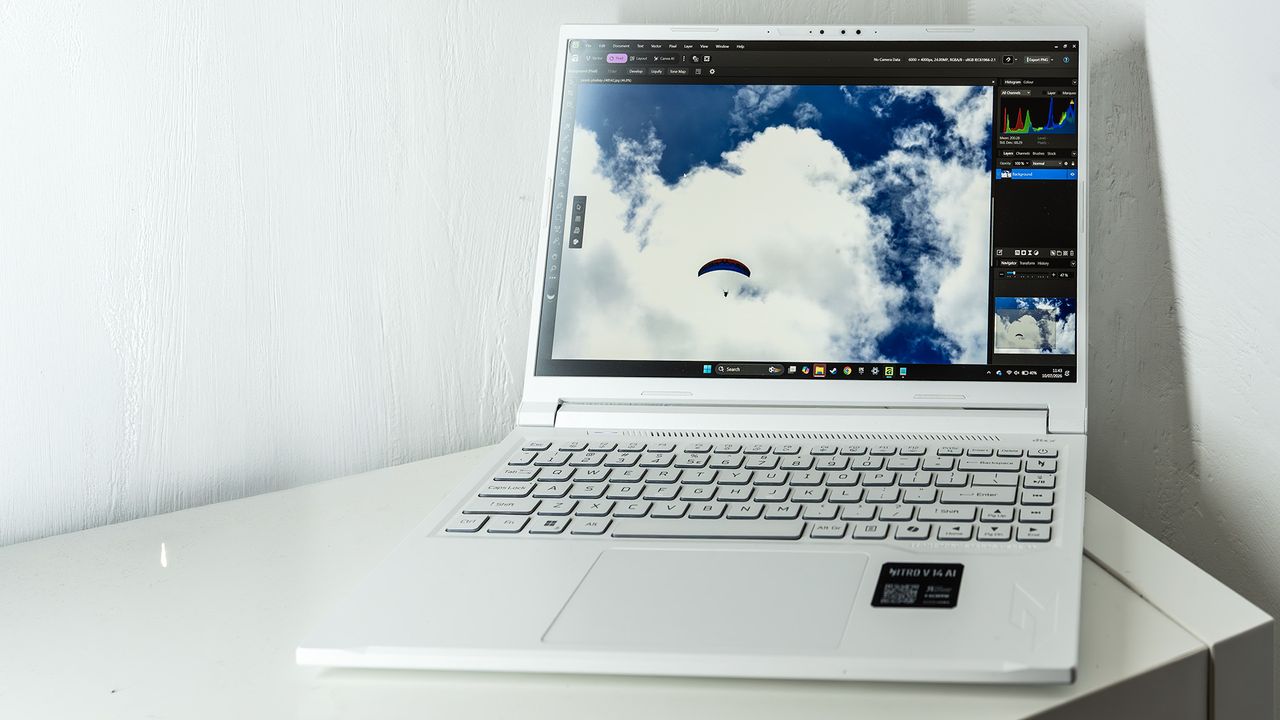
Acer Nitro V 14 AI review: the middle of the road proves its worth
Our Verdict The Acer Nitro V 14 AI may be a gaming laptop by design but it has a lot of creative potential. Not only does it come in a striking white-and-blue colour scheme, but with twice the RAM of many competitors and a battery life that’s not completely awful, this is a laptop that will catch a…
Annons
Annons
Our Verdict The Acer Nitro V 14 AI may be a gaming laptop by design but it has a lot of creative potential. Not only does it come in a striking white-and-blue colour scheme, but with twice the RAM of many competitors and a battery life that’s not completely awful, this is a laptop that will catch a lot of eyes. For Good graphics capabilities Upgradable RAM Eye-catching white and blue Against Screen could produce better colour Battery life merely ‘not bad’ GPU is power-limited Why you can trust Creative Bloq Our expert reviewers spend hours testing and comparing products and services so you can choose the best for you. Find out more about how we test. Jump To: Specs Design & display Features Benchmarks Performance Price Who's it for? Buy it if Don't buy it if Also consider These days you can’t release a new laptop without putting the letters ‘AI’ in its name, and the Acer Nitro range - once a series of entry- and mid-level gaming laptops - is now made up of Copilot+ PCs. They’re still decent gaming machines, of course, with a thoroughly middle-of-the-road eight-core AMD CPU and an RTX 5060 in the one we have here, and that makes them excellent creative machines too, making a case for them among the best laptops for 3D modelling, for example, especially if 32GB of RAM is enough for you.What’s no longer entry-level is the price, which has crept up almost to MacBook Pro levels. We put the Nitro V 14 through its paces to see if it can keep up with the rest of the pack.Key specifications Swipe to scroll horizontally CPU: AMD Ryzen 7 350 NPU: Ryzen AI Graphics: Nvidia GeForce RTX 5060 Memory: 32GB DDR5 Storage: 1TB SSD, microSD Screen size: 14in Screen type: IPS Resolution: 2560 x 1600 Refresh rate: 165Hz Colour gamut (measured): 79% P3 Brightness (measured): 400 nits Ports: 1x USB4, 1x 3.2 Gen 1 Type-A, 1x 3.2 Gen 2 Type-A, 3.5mm audio Wireless connectivity: Wi-Fi 6, Bluetooth 5.4 Dimensions: 22 x 326 x 237mm Weight: 1.74kg Design, build and display (Image credit: Future / Ian Evenden)• Blue and white looks great• UpgradableThe Acer Nitro V 14 we’ve got here is white, which is certainly a choice for a gaming laptop and reminds us of the old ASUS EeePC from 2007. Acer has outfitted it with a blue Nitro logo on the lid, some blue feet underneath and a blue backlight on the keyboard, which gives it a cool, almost futuristic look when placed alongside all the black and silver laptops out there.There's no getting away from the fact that it’s plastic, however, though this does help to keep the weight down. It’s heavier than a MacBook Pro but less than something like a Razer Blade 14, and one benefit of the colour is that your greasy fingermarks don’t show up on it as badly as they do on darker laptops, and nor does dust. An LED that changes colour depending on which performance mode you have it in is a nice touch.The bottom is held on by normal Philips-head screws, no Torx here, and so can be whipped off to reveal an empty M.2 slot for an extra SSD and some SODIMM slots so you can upgrade the RAM (but only by completely replacing what’s already there). There's also a replaceable wireless card (useful if it breaks) and a battery that looks like it could be replaced, though there's no indication of where you’d get a new one, and none of this is covered in the manual available on the Acer website. Still, it’s great to see a degree of repairability and upgradability in a laptop, rather than everything being soldered to the motherboard.Design score: 4/5Get the Creative Bloq NewsletterSign up to Creative Bloq's daily newsletter, which brings you the latest news and inspiration from the worlds of art, design and technology.Contact me with news and offers from other Future brandsReceive email from us on behalf of our trusted partners or sponsorsFeatures (Image credit: Future / Ian Evenden)• 32GB RAM• Only one USB4There are a lot of ports around the side of the Nitro V 14, but they’re a mixed bag. There's only one Type-C, which is USB4 and accepts charging. A pair of Type-As are split between 5 Gbps and 10 Gbps, and there's a full-size HDMI. Some of the ports are quite close together, which may cause an issue if you’re using chunky cables, and there's a dedicated charging port for the 135W charger in the box.This all points to a laptop that can be easily hooked up to external displays and storage, especially if you have a USB4 dock on your desk. Having 32GB of RAM is an important point in the Nitro’s favour - many 5060-sporting gaming laptops have 16GB, and for creative apps that extra memory is going to make a difference.The built-in screen is really not too bad. It’s an IPS rather than an OLED, and is capable of a respectable 400 nits, though its colour response isn’t as good, peaking at 79% of DCI-P3 (78% Adobe RGB, 100% sRGB). Its 165Hz refresh rate is aimed at gamers, but the smooth framerates it’s capable of will appeal to those shooting videos at 120fps, though the resolution isn’t high enough to display 4K footage natively and you’ll be relying on an external monitor for this.Then there's the keyboard - it’s white, to blend in with the rest of the laptop’s colour scheme, and the blue backlight makes it look great. The function keys in the top row are rather small, but the arrow keys are large enough (none of the keys is exactly full-size, but they’re not atrociously tiny) and a row of media control buttons, along with one to launch Acer’s Nitrosense software, has been added on the right-hand side. There's a decent amount of travel and the keys feel good to use - all in all it’s an excellent example of how to make a laptop keyboard that’s good to use. The trackpad is nothing special, but works competently. It’s a different texture to its surroundings and has a slight lip, so you’ll always know when you reach the edge, and it has a solid click. Nothing to complain about here.Feature score: 3/5Benchmark scores (Image credit: Future / Ian Evenden)We test every one of our laptops using the same benchmarking software suite to give you a thorough overview of its suitability for creatives of all disciplines and levels. This includes:• Geekbench: Tests the CPU for single-core and multi-core power, and the GPU for the system's potential for gaming, image processing, or video editing. Geekbench AI tests the CPU and GPU on a variety of AI-powered and AI-boosted tasks.• Cinebench: Tests the CPU and GPU's ability to run Cinema 4D and Redshift.• UL Procyon: Uses UL Solutions' Procyon software suite to test the system's ability for AI image generation in Stable Diffusion, its Microsoft Office performance and its battery life in a looping video test.• Topaz Video AI: We use Topaz Video AI to test the system's ability to upscale video and convert video to slow-motion.• PugetBench for Creators: We use the PugetBench for Creators benchmarking suite to test the system's ability to run several key tasks in Photoshop and Adobe Premiere Pro, as well as its performance when encoding/transcoding video.• ON1 Resize AI: Tests the system's ability to resize 5 photos to 200% in a batch process. We take the total time taken to resize the images and divide by 5.Performance (Image credit: Future / Ian Evenden)• Eight-core CPU• Power limit on GPUThe Ryzen 7 350 is from AMD’s Strix Point generation - one of the latest at the time of writing - and has eight cores. They’re not all full-fat, as four are the newer Zen 5c type that are slightly smaller, usually a little slower, and have slightly less access to processor cache. The idea is to make a more efficient core and improve battery power, without compromising on instructions per clock, and the chip can still process a full 16 software threads. There's also a Radeon 860M GPU attached, but it’s going to get overlooked in favour of the RTX chip.The 5060 is a mid-range gaming card but a good choice for creative work, though the laptop chip can’t hope to keep up with the desktop card we reviewed recently. The one in the Nitro V 14 is further affected by a 60W power draw limit. The laptop 5060 can use up to 100W, but a compromise has been made here in favour of battery life and cooling - the Nitro never gets really loud even when placed into its Turbo mode, though you’ll hear the fans turning whenever you make it work. There are some chunky vents on the back edge to aid cooling too.In creative and AI apps, the presence of that GPU means the Nitro has no problem with things like Lightroom denoising or multi-layer Photoshop documents. In the Geekbench 6 multi-core benchmark it’s only about 1,000 points (about 8%) behind the M5 in the latest MacBook Air (though the Pro pulls ahead) and its GPU beats that of the HP Z2 Mini G1a workstation. It scores very well in our Photoshop benchmark, beating the likes of MSI’s Stealth 18 and Geekom’s A9 Max mini PC, though it did comparatively badly when asked to generate images in Stable Diffusion, the machines with Intel and Snapdragon processors leaving it behind (the ASUS PX13 GoPro Edition and HP Z2 Mini, both with AMD chips, scored poorly here too).When it comes to battery life, the Nitro is nothing special, but doesn’t do too badly for a gaming machine. At just over five and a half hours, it’s not going to let you work all day without plugging in, but will let you while away some time in a pub garden while checking your messages.Performance score: 3/5 (Image credit: Future / Ian Evenden)Price In the UK the Nitro V 14 as reviewed here is available for around £1,650. This makes it just barely more expensive than an ASUS TUF laptop that’s similarly specced apart from having 16GB of RAM - and if you’re wanting to use this for video or 3D work, the extra memory will be more important than a tiny saving.In the US,Value score: 3/5Who is it for?• Graphics pros and gamersThere's nothing wrong with using a gaming laptop for gaming, as long as your office manager isn’t breathing down your neck, but with its combo of powerful processors and that 32GB RAM boost over similar machines, the Nitro V 14 is going to do well in all the graphics tasks you set it. Swipe to scroll horizontally Acer Nitro V 14 AI score card Attributes Notes Rating Design: The blue and white scheme looks really good. 4/5 Features: USB4 is good, but the screen lacks colour response. 3/5 Performance: Very decent CPU and GPU scores in our tests. 4/5 Value: Pricey, but not too bad for a laptop with 32GB of RAM. 3/5 (Image credit: Future / Ian Evenden)Buy it if...You can make use of that GPUThe extra RAM is important to youYou fancy a bit of gaming tooDon't buy it if...Battery life is more important than sheer powerYou want a higher-res screenYou need something cheaperAlso consider Apple MacBook Air M5 (2026) Silent, thin, light and powerful: the M5 version of the MacBook Air is a top purchase for many creative tasks. Gigabyte Aorus Master 16 (2025) A powerful gaming laptop with all the latest kit on-board, including a 50-series graphics card from Nvidia, so any serious creative pro will find plenty to like here if they can stomach the price. Asus Zenbook Duo 2026 If you like the idea of working across two displays at once, the best just got better. This gorgeous two-screened laptop from ASUS returns for a 2026 refresh, now with more processing muscle thanks to Intel's cutting-edge Panther Lake chip. The Verdict 7.8 out of 10 Acer Nitro V 14 The Acer Nitro V 14 AI may be a gaming laptop by design but it has a lot of creative potential. Not only does it come in a striking white-and-blue colour scheme, but with twice the RAM of many competitors and a battery life that’s not completely awful, this is a laptop that will catch a lot of eyes. Ian EvendenFreelance writerIan Evenden has been a journalist for over 20 years, starting in the days of QuarkXpress 4 and Photoshop 5. He now mainly works in Creative Cloud and Google Docs, but can always find a use for a powerful laptop or two. When not sweating over page layout or photo editing, you can find him peering at the stars or growing vegetables. View More You must confirm your public display name before commenting Please logout and then login again, you will then be prompted to enter your display name. Logout Back To Top LATEST ARTICLES 1 Free Prime Video gaming upgrade could make Amazon the winner of the RAM crisis 2 Anycubic's best 3D printer hits its lowest price ever for 15 hours only 3 Halo: Campaign Evolved (PS5) review: the Unreal Engine 5 remake is almost everything fans could hope for 4 Meet 'Zero Shadow Day', the bizarre natural optical illusion that occurs twice a year in Hawaii 5 This anime-themed game is like Katamari Damacy, Crazy Taxi and Tony Hawk rolled into one, with a mix of 2D anime, pixel art and Dreamcast-era 3D visuals – it shouldn’t work but does