How to build a digital painting from the ground up using Photoshop and Blender
Art Digital Art How to build a digital painting from the ground up using Photoshop and Blender How to By Pierre Ignaszewski Published 12 July 2026 Fantasy freelancer Pierre Ignaszewski shares his process. When you purchase through links on our site, we may earn an affiliate commission. Here’s how...
Annons
Annons
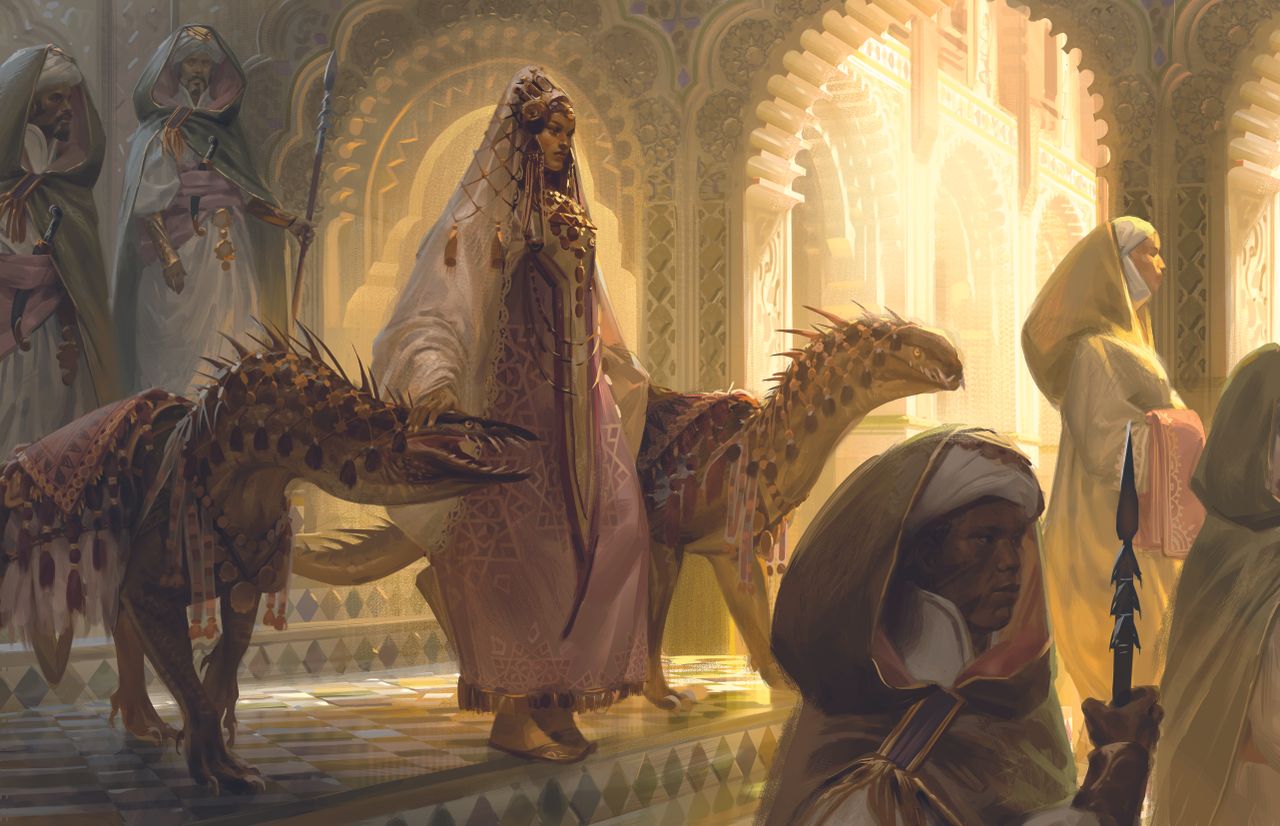
Art Digital Art How to build a digital painting from the ground up using Photoshop and Blender How to By Pierre Ignaszewski Published 12 July 2026 Fantasy freelancer Pierre Ignaszewski shares his process. When you purchase through links on our site, we may earn an affiliate commission. Here’s how it works. (Image credit: Pierre Ignaszewski) Copy link Facebook X Whatsapp Pinterest Flipboard Email Share this article 0 Join the conversation Follow us Add us as a preferred source on Google Newsletter Subscribe to our newsletter This illustration is a personal piece representing a queen out on a walk with her two beloved pets. I started this illustration in Blender to experiment with architecture and mood before exporting it to Photoshop to draw the different characters.I then started rendering, starting with the queen and creatures and working my way from the front to the background while going back into Blender to detail the architecture. A complex scene can be intimidating! In my experience, taking it slow and building a strong base is more than half of the work.Although I used Photoshop and Blender, you might be able to find a comparable workflow that works for you by combining the best digital art software and 3D modelling software. You might also want one of the best drawing tablets.Latest Videos FromWatch full video here: 01. Build strong foundations Define the global values, colours, and composition first. The goal here is to keep things simple and focus on legibility, so pay attention to the shapes and silhouettes the characters make in the scene. Remember to keep the figures in separate grouped layers to easily move and scale them if needed. 02. Start detailing Start detailing your focal point with the range of values and colours you established, but keep a slightly bigger range for the main characters compared to the others. The focal point should also have the highest amount of detail, but remember to periodically zoom out to make sure you’re not losing legibility. 03. Complete the scene Continue rendering the characters and blend the hard edges that take away from the focus. For the background, simplify your rendering style to avoid overcrowding with details. Don’t hesitate to change things if you feel like it improves your illustration. This article originally appeared in ImagineFX. Subscribe to ImagineFX to never miss an issue. Print and digital subscriptions are available.Creative Bloq is now easier to access than ever before with our on-the-go app, which brings you all the content you know and love from our website, but in a super-streamlined design.Download the Creative Bloq app for iOSDownload the Creative Bloq app for Android You may like How simple 3D blockouts help build realistic fantasy art How I blend ancient mythology with cinematic futurism in my digital art using Blender and Photoshop How this Blender artist redesigned a beloved illustration in full 3D Get the Creative Bloq NewsletterSign up to Creative Bloq's daily newsletter, which brings you the latest news and inspiration from the worlds of art, design and technology.Contact me with news and offers from other Future brandsReceive email from us on behalf of our trusted partners or sponsorsBy submitting your information you agree to the Terms & Conditions and Privacy Policy and are aged 16 or over. TOPICS Illustration Art Pierre IgnaszewskiSocial Links NavigationPierre is a fantasy illustrator working on various TTRPGs. He enjoys creating high fantasy worlds and loves including creatures in his work. View More You must confirm your public display name before commenting Please logout and then login again, you will then be prompted to enter your display name. Logout Read more Digital Art How simple 3D blockouts help build realistic fantasy art Digital Art How I blend ancient mythology with cinematic futurism in my digital art using Blender and Photoshop 3D Art How this Blender artist redesigned a beloved illustration in full 3D Digital Art Avatar concept artist shows how she creates a fairy-tale castle using a 3D workflow in Blender Digital Art Using real-world reference images can upgrade your fantasy art Digital Art How I blend 3D and 3D effects to create video game key art art using Blender and Photoshop Latest in Digital Art Digital Art How combining software can bring your game scenery art to life Digital Art Spontaneous speed painting could help you to trust your art Character Design Marvel Rivals’ Captain America was too raunchy for this world Digital Art How this artist turned a view he sees every day into a futuristic sci-fi scene Digital Art How background artists define the tone of movies and games before the action even starts Character Design How to make the characters in your artwork act with real personality Latest in How to Digital Art How combining software can bring your game scenery art to life Digital Art Spontaneous speed painting could help you to trust your art 3D How to build quality 3D characters within the constraints of mobile game fidelity Digital Crafting How to customise for Pride with these easy Cricut projects Digital Art How this artist turned a view he sees every day into a futuristic sci-fi scene Character Design How to make the characters in your artwork act with real personality LATEST ARTICLES1Apple's AI struggle turns ugly as it sues OpenAI and io, the company founded by iPhone designer Jony Ive2Not a Smart Ring person? Perhaps 43% off could change that3Why this indie Star Trek film team thinks AI could finally fix VFX's biggest headache4How combining software can bring your game scenery art to life5A Disney special effect from the 1930s is still blowing people's minds today