iPad users finally have the free Adobe alternative they've been asking for
Copy link Email Share this article 0 Join the conversation Follow us Add us as a preferred source on Google Newsletter Subscribe to our newsletter A year ago, a lot of people couldn't quite believe it when Canva made Affinity free. Suddenly, the three paid-for apps obtained through the acquisition…
Annons
Annons
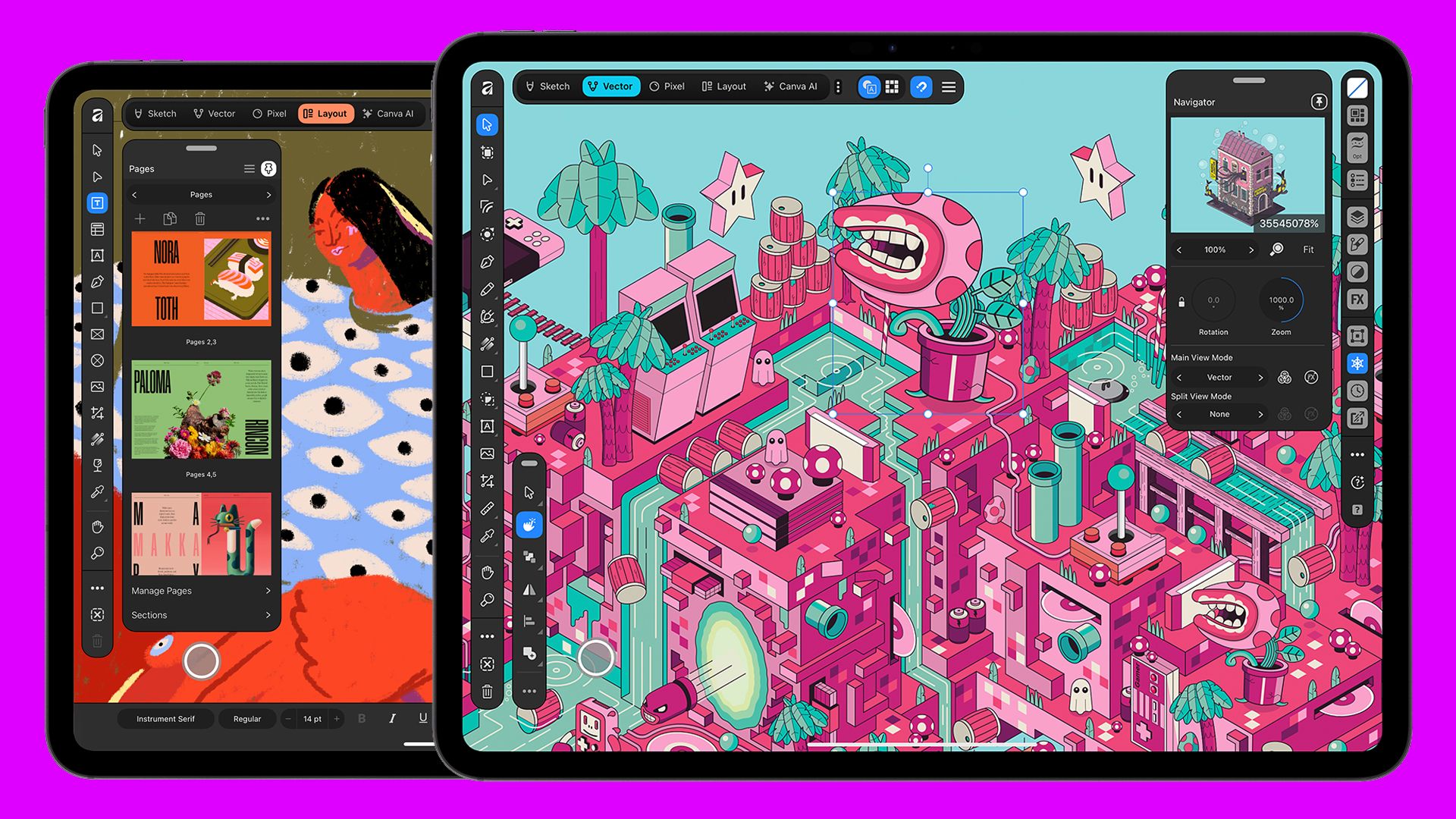
Copy link Email Share this article 0 Join the conversation Follow us Add us as a preferred source on Google Newsletter Subscribe to our newsletter A year ago, a lot of people couldn't quite believe it when Canva made Affinity free. Suddenly, the three paid-for apps obtained through the acquisition of Serif were rolled into a single piece of creative software covering everything from photo editing to vector art and desktop publishing, simultaneously serving as a free Photoshop alternative, InDesign alt and Illustrator alt.There had to be a catch, and one of the suspicions was that the new Affinity would be unlikely to get regular upgrades or improvements. One year on, Canva seems to be defying those predictions. It added new raw photo editing capabilities last month, with more colour, sharpening and detail adjustments. Today, it's completed things by adding one major element that was still missing for many creatives' workflows: a dedicated Affinity for iPad.The individual Affinity apps (Affinity Photo 2, Designer 2, Publisher 2) were previously available for iPad before last year's launch of the unified free Affinity for desktop. Users who had bought them could continue using the apps, but they didn't support the new .af file format.The new single-app Affinity for iPad brings the bulk of the combined desktop software to Apple tablets but designed specifically for a touch-first interface. It also takes advantage of Apple Pencil capabilities like pressure and tilt for sketching or for masking images, as well as Apple Pencil Pro's barrel roll, squeeze and hover features.The app features Sketch Studio for freehand drawing and sketch-to-vector workflows, and several iPad-first features like a Mask Tool and Sketch to Shapes. Image 1 of 6 Affinity for iPad (Image credit: Canva) (Image credit: Canva) (Image credit: Canva) (Image credit: Canva) (Image credit: Canva) (Image credit: Canva) Image 1 of 6 View Original Image 2 of 6 View Original Image 3 of 6 View Original Image 4 of 6 View Original Image 5 of 6 View Original Image 6 of 6 View Original Like on the desktop app, Affinity for iPad uses the same .af file format across sketch, vector, photo and layout processes to make cross-media workflows easier. Non-destructive edits render in real time and there's no need for assets to be exported, converted or remade.For sketching, there's a brush library with controls to shape each brush, while sketches stay live in the file to build on, rather than trace again. The iPad app also includes Affinity's raw image editing capabilities and the ability to create print-ready multi-page documents.Get the Creative Bloq NewsletterSign up to Creative Bloq's daily newsletter, which brings you the latest news and inspiration from the worlds of art, design and technology.AI tools, including Generative Expand, upscaling, denoising, and Decompose Layer to split a flat image into editable layers, are available with a subscription via Canva AI Studio.An increasing range of major software is now available in the form of dedicated iPad apps, from Adobe's main apps like Photoshop, Illustrator and Premiere to DaVinci Resolve for video editing and Maxon's ZBrush for 3D sculpting. This means the powerful iPad Pro can now be used to its full potential for creative work, allowing more mobile workflows, either for working remotely or simply allowing creatives to take time away from the desk to work in another place before coming back to pick things up on desktop.Affinity for iPad is is free for individual users and available to download from the iPad App Store now. If you don't already have one, you'll need to create a free Canva account to use the app. A premium Canva subscription is required for AI tools. TOPICS Joe Foley Freelance journalist and editor Joe is a regular freelance journalist and editor at Creative Bloq. He writes news, features and buying guides and keeps track of the best equipment and software for creatives, from video editing programs to monitors and accessories. A veteran news writer and photographer, he now works as a project manager at the London and Buenos Aires-based design, production and branding agency Hermana Creatives. There he manages a team of designers, photographers and video editors who specialise in producing visual content and design assets for the hospitality sector. He also dances Argentine tango. View More You must confirm your public display name before commenting Please logout and then login again, you will then be prompted to enter your display name. Logout LATEST ARTICLES 1 The real star of the new MacBook Pro is the Apple logo 2 Will your digital work still exist in 2046? Here’s why the answer might be no 3 If smart glasses take off, I predict a new golden age for the billboard 4 From Pepsi Man to WendyQuest, why are brands making video games again? 5 "I’ve ignored most advice and learned by fire": 5 Questions with Christopher Glass